

Apple has introduced Final Cut Camera 2.4, a major update to its professional mobile video recording application that focuses on improving camera control, monitoring precision, and integration with professional production workflows. The update introduces a redesigned recording interface, expanded exposure management options, enhanced focus tools, and additional monitoring capabilities designed to make the iPhone a more versatile tool for filmmakers and content creators.
According to the supplied release details, the free software update became available on September 29 and expands the application’s functionality through hardware-level camera controls on the iPhone 18 Pro and additional features enabled by iOS 27. The changes target both independent creators working on mobile productions and professional teams incorporating iPhones into multi-camera filming environments.
With more direct access to recording parameters and improved visual monitoring tools, Final Cut Camera 2.4 aims to simplify the process of capturing footage while giving operators greater control over the technical characteristics of their images.
Hardware Aperture Control Arrives on iPhone 18 Pro
One of the most notable additions described in Final Cut Camera 2.4 is hardware aperture control for the iPhone 18 Pro. The device’s reported Fusion Main camera introduces a variable-aperture system, allowing filmmakers to adjust the physical aperture rather than relying exclusively on software-based exposure and depth effects.
Aperture determines how much light passes through a camera lens to reach the image sensor. It also influences depth of field, which describes how much of a scene appears acceptably sharp in front of and behind the point of focus. A wider aperture allows more light to enter and generally produces a shallower depth of field, while a narrower aperture reduces incoming light and can keep more of a scene in focus.
For filmmakers, these adjustments are useful in a variety of shooting conditions. During interviews, a wider aperture can help separate a subject from the background. In landscape footage or scenes featuring several people at different distances, a narrower aperture may help preserve detail throughout the composition.
The reported integration of manual aperture adjustments into Final Cut Camera would give operators more direct control over these creative decisions. Rather than adjusting exposure exclusively through ISO, shutter settings, or software processing, users could make physical aperture changes from within the recording interface.
New Shutter and Aperture Priority Modes
The update also introduces dedicated shutter-priority and aperture-priority exposure modes.
In shutter-priority mode, the filmmaker selects the shutter setting while the camera automatically adjusts another exposure parameter to compensate for changing light. This is useful when maintaining consistent motion rendering is more important than preserving a particular aperture.
Aperture-priority mode reverses that relationship. The operator selects the desired aperture, while the camera adjusts other exposure settings to help maintain the target brightness. This can be useful when consistent depth of field is a priority, particularly during interviews, product demonstrations, and narrative scenes.
These modes provide a more flexible approach to exposure management, especially when shooting outdoors or moving between locations with different lighting conditions.
Cinematic Depth Effects for Regular Video
Final Cut Camera 2.4 is also described as extending Cinematic mode depth effects to regular video capture, including high-quality recording formats such as ProRes and Apple Log.
The reported workflow allows editors to make further adjustments in Final Cut Pro on desktop, including changing focus targets and modifying the depth of field applied to recorded footage.
This could offer greater flexibility during post-production. For example, an editor may decide that attention should shift from a foreground subject to an object in the background. The ability to revise focus and depth effects after recording can reduce the need to repeat a shot simply because a creative decision changes during editing.
However, the extent of this functionality depends on the supported recording format, device hardware, and depth information captured during filming. Compatibility should be confirmed against Apple’s official technical documentation before production teams build a workflow around these capabilities.
Redesigned Interface Improves Manual Camera Operation
The second major focus of Final Cut Camera 2.4 is its redesigned interface. Professional video recording frequently requires operators to make adjustments while a scene is unfolding, leaving little time to navigate complicated menus.
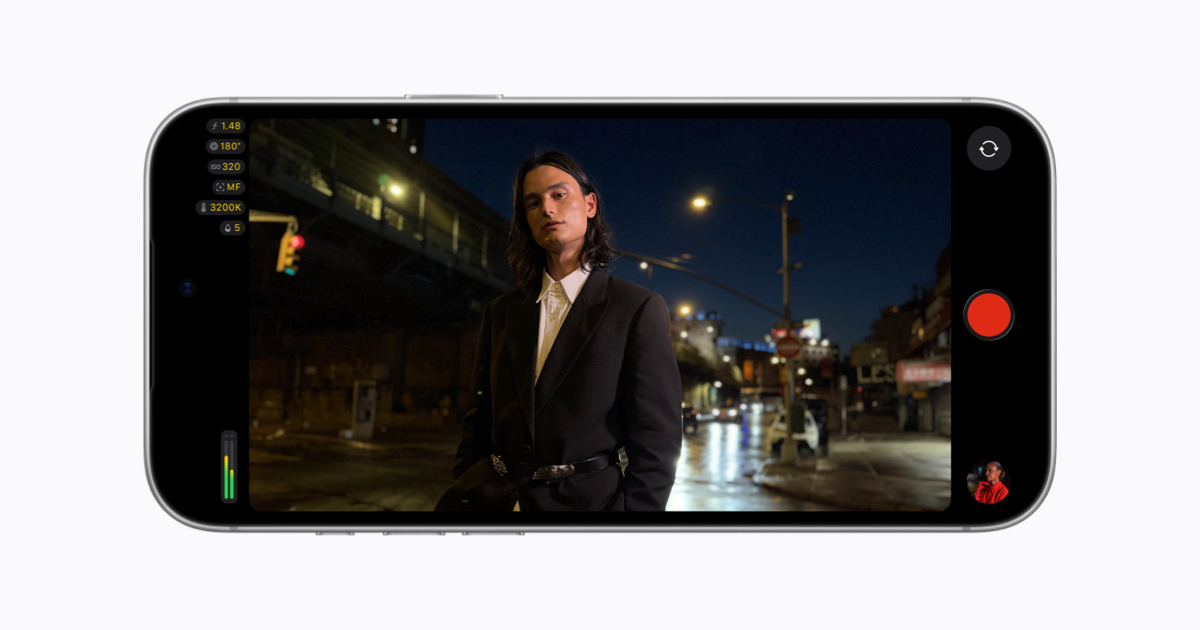
The updated layout reportedly places important recording controls directly within the primary shooting display. Settings such as shutter angle, ISO, and white balance can be adjusted more quickly without repeatedly navigating away from the viewfinder.
Shutter angle is especially useful for filmmakers working with established motion-picture conventions. It describes the relationship between the camera’s frame rate and the duration of each exposure. Maintaining an appropriate shutter angle helps produce consistent motion blur, while changing it can create a different visual effect.
ISO controls the camera system’s sensitivity to incoming light through its exposure-gain settings, while white balance influences how the camera interprets color under different lighting conditions. Direct access to these parameters gives operators more immediate control over the look of their footage.
By reducing the number of steps required to adjust recording settings, the redesigned interface could make the application more practical for fast-moving documentary shoots, interviews, event coverage, and other situations where the operator must react quickly.
Enhanced Focus and Exposure Monitoring Tools
Final Cut Camera 2.4 introduces additional monitoring tools intended to help filmmakers evaluate exposure and focus more accurately while recording.
False Color and Clipping Indicators
False color overlays provide a visual representation of exposure levels across the image. Instead of judging brightness solely from the viewfinder, operators can use different colors to identify areas that fall within particular exposure ranges.
This is particularly useful when recording scenes with high contrast, such as a person standing near a bright window or filming outdoors under strong sunlight. False color can help identify whether important details are being lost in highlights or shadows.
Clipping indicators provide another layer of feedback by identifying areas that exceed the available exposure range. Highlight clipping can remove detail from bright portions of an image, while crushed shadows can obscure information in darker areas.
These tools are valuable for filmmakers who want to make exposure decisions based on measurable visual feedback rather than relying entirely on the appearance of a phone display.
Improved Focus Peaking
The update also enhances focus peaking with dedicated sensitivity controls.
Focus peaking highlights areas of the image that appear sharply focused, helping operators determine whether a subject is in focus while using manual focusing. Adjustable sensitivity can make the feature more adaptable to different scenes.
For example, a high-contrast subject may produce clear focus indicators with relatively low sensitivity. A low-light scene or a subject with limited contrast may require different settings to make the indicators useful without filling the image with distracting highlights.
This improvement could benefit close-up photography, product videos, interviews, and other situations in which accurate focus is essential.
On-Screen Tally Light and Clean Viewfinder
The redesigned application adds an on-screen tally light that provides a visible indication when recording is active. This can help operators quickly confirm the camera’s status, particularly when the phone is mounted on a rig or used in a multi-camera environment.
Another convenience is the two-finger tap gesture, which reportedly hides the on-screen controls and monitoring indicators. Removing interface elements from the viewfinder provides an unobstructed preview of the composition, helping filmmakers evaluate framing and subject placement.
Together, these additions focus on improving usability without sacrificing the technical information required for professional recording.
iOS 27 Adds Professional Monitoring and Broadcast Features
Final Cut Camera 2.4 is also described as gaining additional monitoring and connectivity features through iOS 27. These functions are aimed at productions that require more precise exposure analysis and integration with external video equipment.
Histogram and RGB Parade Scopes
The reported addition of professional video scopes gives operators more detailed ways to evaluate exposure and color.
A histogram displays the distribution of brightness values in an image, helping filmmakers determine whether a shot contains an appropriate balance of shadows, midtones, and highlights. It can reveal exposure problems that may be difficult to identify by looking at a display under changing ambient light.
An RGB Parade scope separates the red, green, and blue color channels into individual displays. This makes it easier to identify color imbalances, evaluate channel clipping, and assess whether neutral objects are being reproduced consistently.
For productions that need repeatable results across multiple shots, these tools can support more consistent exposure and color decisions. They are especially useful when lighting conditions change or when matching footage captured by different cameras.
Clean SDI Output for External Monitoring
Another reported addition is clean SDI output through an HDMI-to-SDI converter. SDI, or Serial Digital Interface, is widely used in professional video environments to carry video signals between cameras, monitors, switchers, and broadcast equipment.
A clean output removes camera-interface elements from the displayed image, allowing external equipment to receive an unobstructed video feed. This is useful when a director, focus puller, or technical operator needs to monitor the image independently of the person controlling the phone.
Potential applications include studio production, live streaming, event coverage, and multi-camera recording. The practical setup will depend on supported adapters, signal formats, resolution, frame rate, and the compatibility of the connected equipment.
Genlock Offset for Multi-Camera Synchronization
The supplied release description also highlights genlock offset controls for synchronized production environments.
Genlock is a synchronization technique used to align video timing between compatible devices. In multi-camera production, synchronized timing helps ensure that footage from different sources can be switched or combined consistently.
Genlock offset adjustments can help operators compensate for timing differences between devices or account for visual artifacts that arise when filming screens and digital backdrops.
For productions involving multiple cameras, these controls could make an iPhone more useful as an additional recording source. However, genlock compatibility depends on the complete hardware and software setup, and the availability of an offset control alone does not establish that every iPhone configuration supports traditional hardware genlock.
What the Update Means for Filmmakers and Content Creators
Final Cut Camera 2.4 reflects the broader movement toward using smartphones in increasingly sophisticated video production workflows. Mobile devices already offer advantages in portability, rapid setup, and access to compact recording equipment. More extensive manual controls and monitoring features can make those advantages more useful in demanding environments.
Independent filmmakers could benefit from improved exposure tools and flexible depth effects. Social media creators may appreciate faster access to recording settings and a cleaner viewfinder. Professional production teams could find value in external monitoring and expanded synchronization options, provided their equipment is compatible.
The update may also help streamline the transition from filming to editing. When camera controls, recording formats, and depth-related adjustments integrate effectively with desktop editing software, creators can spend less time correcting avoidable capture problems and more time refining the finished production.
Nevertheless, advanced software features do not eliminate the importance of lighting, composition, camera movement, audio quality, and editorial judgment. Filmmakers should also verify device compatibility and test their complete recording workflow before using new features on a critical shoot.
Conclusion
Final Cut Camera 2.4 is presented as a substantial upgrade to Apple’s professional mobile video recording application, combining a redesigned interface with more advanced camera controls, exposure monitoring, manual focus assistance, and broadcast-oriented connectivity.
The reported variable-aperture controls on iPhone 18 Pro could provide greater creative flexibility, while false color, clipping indicators, focus peaking, histogram monitoring, and RGB Parade analysis could help operators capture more consistent footage. Clean video output and genlock offset controls could further expand the application’s usefulness in professional production environments.
For filmmakers and content creators, the central benefit is greater control over the recording process without abandoning the portability of an iPhone-based setup. If the described features perform reliably across supported devices and workflows, Final Cut Camera 2.4 could strengthen the role of mobile video capture in both independent filmmaking and professional production.